

Google shipped Site Kit 1.192.0 for WordPress in mid-November, and its changelog lists one entry with the biggest impact: "Add 'Recent activity' to dashboard." It puts near real-time search performance in front of millions of site owners who rarely open Search Console. The same release lays the groundwork for AI-generated insights, which Google hasn't announced.
What Recent activity shows in Google Site Kit
Recent activity has been in testing behind a "Fresh Data" feature flag since early autumn. GitHub issue #14131 removed that flag because the feature is "immediately rolling out to all users," so the plugin now behaves "as if it's always on." The issue was closed on November 16, 2026.
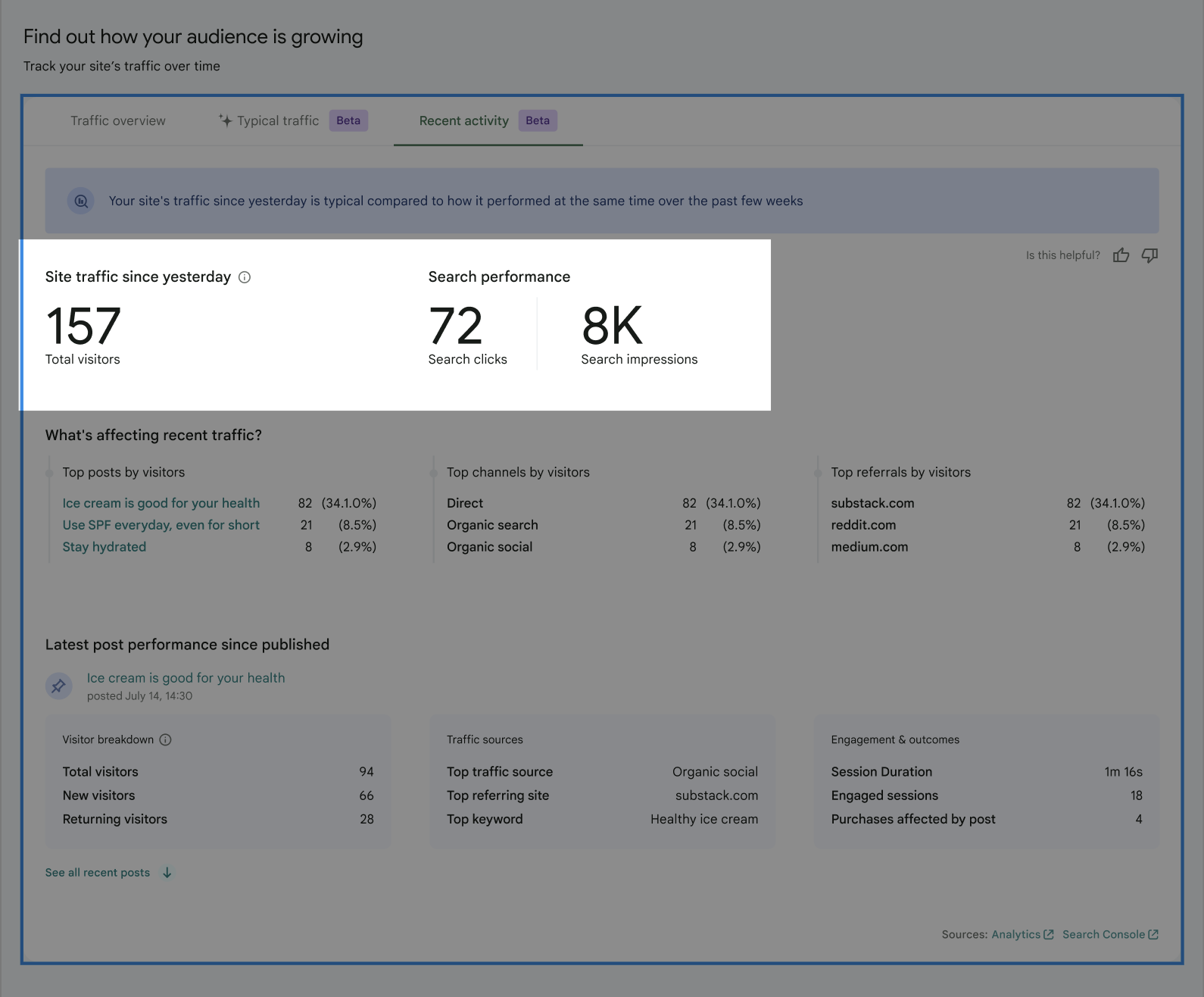
According to the changelogs for 1.191.0 and 1.192.0, Recent activity adds:
- Fresh totals for visitors (from Google Analytics), plus clicks and impressions (from Search Console)
- The top posts, channels and referrals driving recent traffic
- A section on how your newest post is performing
- An insight notice comparing recent traffic to your site's usual performance
- A "Latest content" tab listing recent posts and their early numbers
WooCommerce sites can also include their newest products. That setting is on by default.
How fresh is the data?
The technical spec in GitHub issue #13683 explains the plumbing. Site Kit requests Search Console data with the hourly_all data state, which includes the newest, still-partial hours. It sums those hourly rows into click and impression totals. Results are cached for five minutes, not the usual hour.
That relies on the hourly data Google added to the Search Analytics API in April 2025. The API returns hourly breakdowns for up to 10 days, Search Engine Roundtable reported at the time.
The spec describes the window as "since yesterday," and the design's tooltip says it shows traffic from the last 24 hours, with data taking up to six hours to update. These numbers are partial by design. The latest hours can still change.
Confirmed, reported and unconfirmed
- Confirmed in Google's changelog: Recent activity is on for everyone in 1.192.0, plus new AI content components and a Site Goals insight data builder.
- Reported: none. No outlet or Google announcement has covered the release yet.
- Unconfirmed: what the AI components will power, when it will ship, and which model would write the insights. The code adds an AI icon, an AI disclosure line and AI text formatting, but no AI feature has shipped.
How Site Kit got here
- April 2025: the Search Analytics API adds hourly data for the past 10 days.
- May 2026: Site Kit 1.179.0 starts Site Goals conversion widgets behind a flag, per Relevant Audience.
- September 7, 2026: Site Goals becomes generally available in 1.187.0.
- October 2026: 1.190.0 adds a Recent activity tab behind the Fresh Data flag.
- November 2026: 1.192.0 turns Recent activity on and adds the first AI components.
Takeaway: Site Kit is turning from a plain stats viewer into a dashboard that interprets your data, and AI looks like the next step.
What Site Kit's Recent activity means for publishers and SEOs
Our take: fresh search data in WordPress is useful for news sites and publishers. You can see whether a post published this morning is picking up impressions before the day ends, without opening Search Console. That matters most for timely content, where the first 24 hours decide most of the traffic.
The risk is reading too much into it. Partial hourly data swings. A post with zero clicks after six hours isn't failing. And the "compared to typical performance" notice will now prompt millions of site owners to react to short-term dips, during a core update month too.
The AI components are the bigger signal. Google is building the parts needed to label AI-written text inside WordPress dashboards, next to a builder for Site Goals insight data. AI summaries of traffic and conversions look likely, but Google hasn't confirmed anything.
What to do now:
- Update Site Kit to 1.192.0 and check that Analytics and Search Console are both connected. Recent activity needs both for the full view.
- Use Recent activity to check new posts on day one, but judge performance on full days in Search Console.
- For agency clients, explain that the fresh numbers are partial, so a midday dashboard check doesn't start a fire drill.
- If you run WooCommerce, decide whether you want products or posts in the "latest" slot. Products are on by default.
- Watch the next Site Kit releases for an AI insights feature, and check what data it sends to Google before you turn it on.
What to watch
Watch for an official Google post on Recent activity, the first AI-generated insight in a Site Kit release, and whether those insights cover search data, Site Goals conversions or both.
Site Kit now shows WordPress owners what happened yesterday, not last week. The next step looks like Google explaining that data to them in AI-written text.